April 13, 2026

Stop rebuilding your monthly report from scratch.

Eight FP&A analyses to automate in Google Slides—templates included—so time goes back to analysis, not formatting.

Ask any FP&A team where their time spent on monthly reporting actually goes, and the answer is almost never "analysis." It is the formatting. The rebuilding. The pixel-pushing. Getting the charts to look right in the deck, again, for the third month in a row.

The last mile of the FP&A reporting process is where time goes to die. The numbers are in, the analysis is done, and now you are staring at last month's deck trying to remember which chart links to which sheet, what you manually adjusted, and why that one waterfall bar is the wrong color again.

We built Chartbuddy to automate that loop. It is recurring reporting software for Google Slides: build your report once, link every chart to your Google Sheets data, and let it update when the data does. No copy-pasting, no reformatting. It automates charts in your presentation so your time goes back to analysis, where it belongs.

But a tool is only half the story. To actually help, we put together a set of monthly analyses that we think belong in most FP&A reporting cycles, regardless of industry. For each one, we have built a chart template inside Chartbuddy. When you create a new chart, just pick the template, connect your data, and you are off.

Here is what we suggest reporting on every month, and why.
Revenue bridge (waterfall)

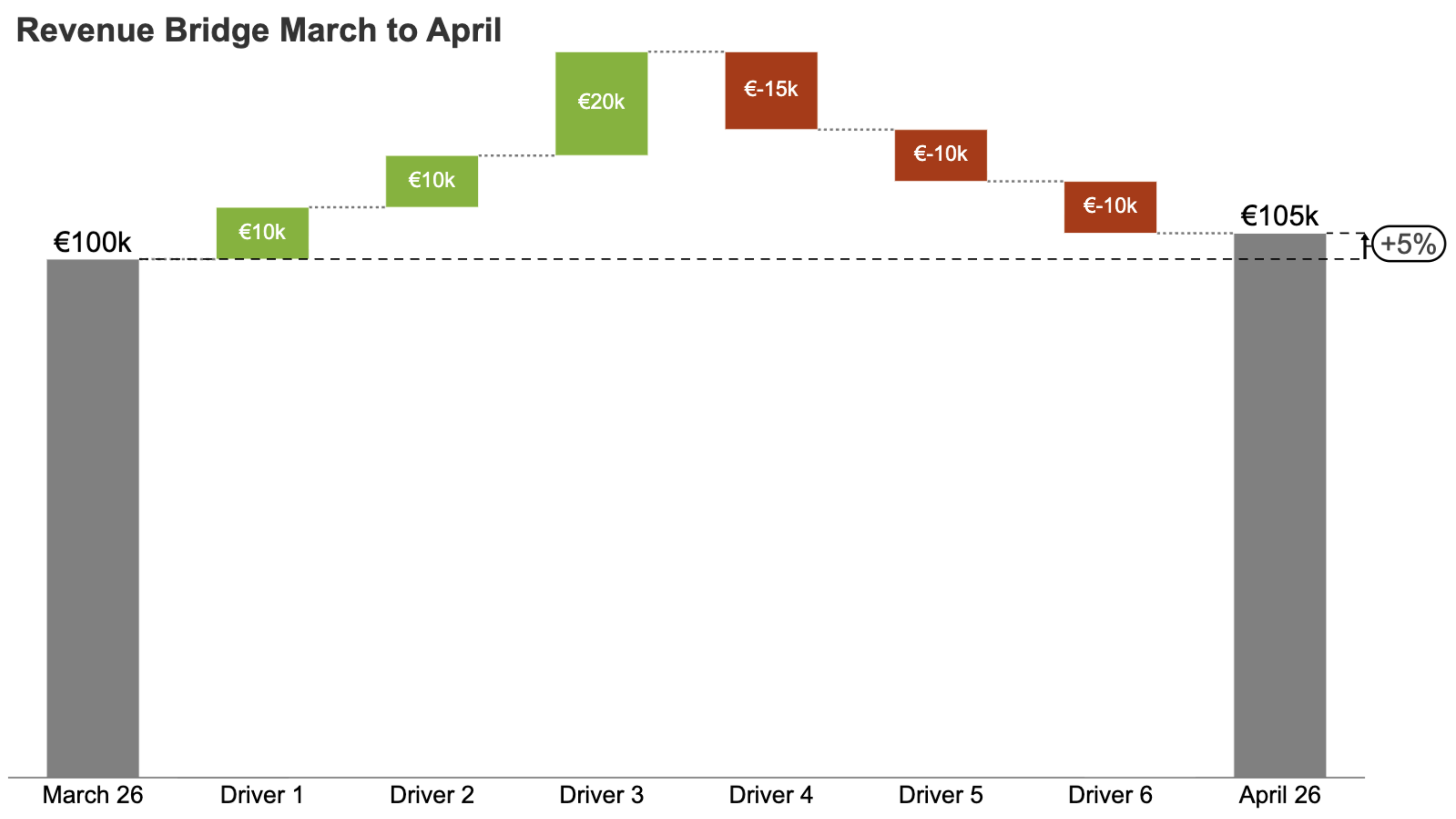
Revenue bridge waterfall chart from March to April showing drivers and net change

A month-over-month waterfall that breaks down what drove revenue up or down. New customers, price changes, volume shifts, churn. Each gets its own bar, so you can see the story behind the number instead of just the number.

Useful in any monthly or quarterly revenue review. Especially when revenue moved and leadership wants to know why without digging through a spreadsheet.

The thing this chart does well: it exposes what a flat revenue line is hiding. Growth in one segment can easily mask decline in another, and a waterfall makes that obvious at a glance.

Budget vs. actuals

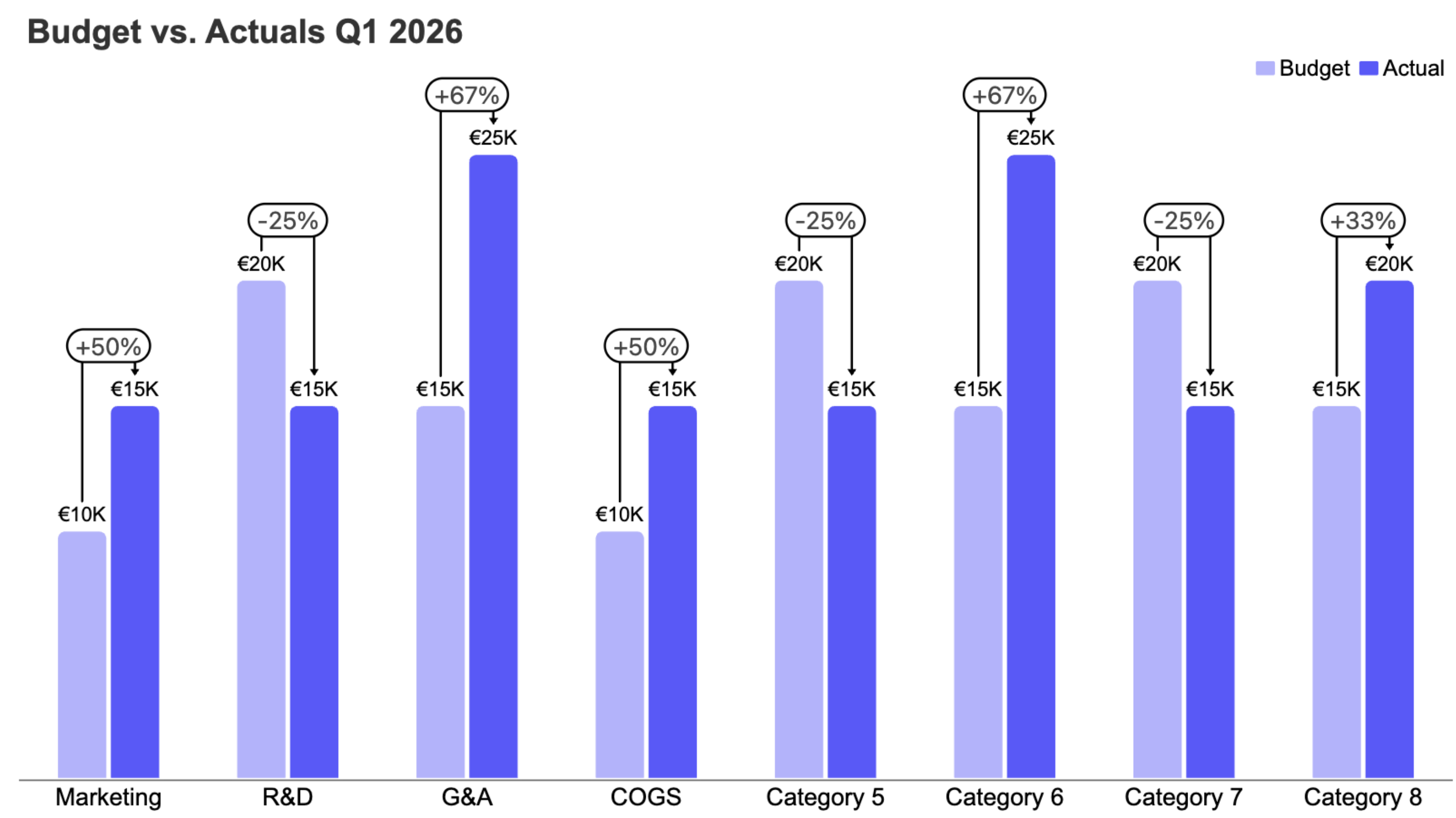
Budget versus actuals comparison chart by category

Side-by-side comparison of what you planned to spend versus what you actually spent, broken down by cost center or category. Usually with a variance column or bar showing the delta.

This is the bread and butter of FP&A. If you are only reporting one thing, it is probably this. Every month, no exceptions.

And it is not just about catching overspend. Underspending is not always good news either. It might mean projects are stalling or teams are not executing on plan. The variance tells you where to dig deeper.

Cash flow summary

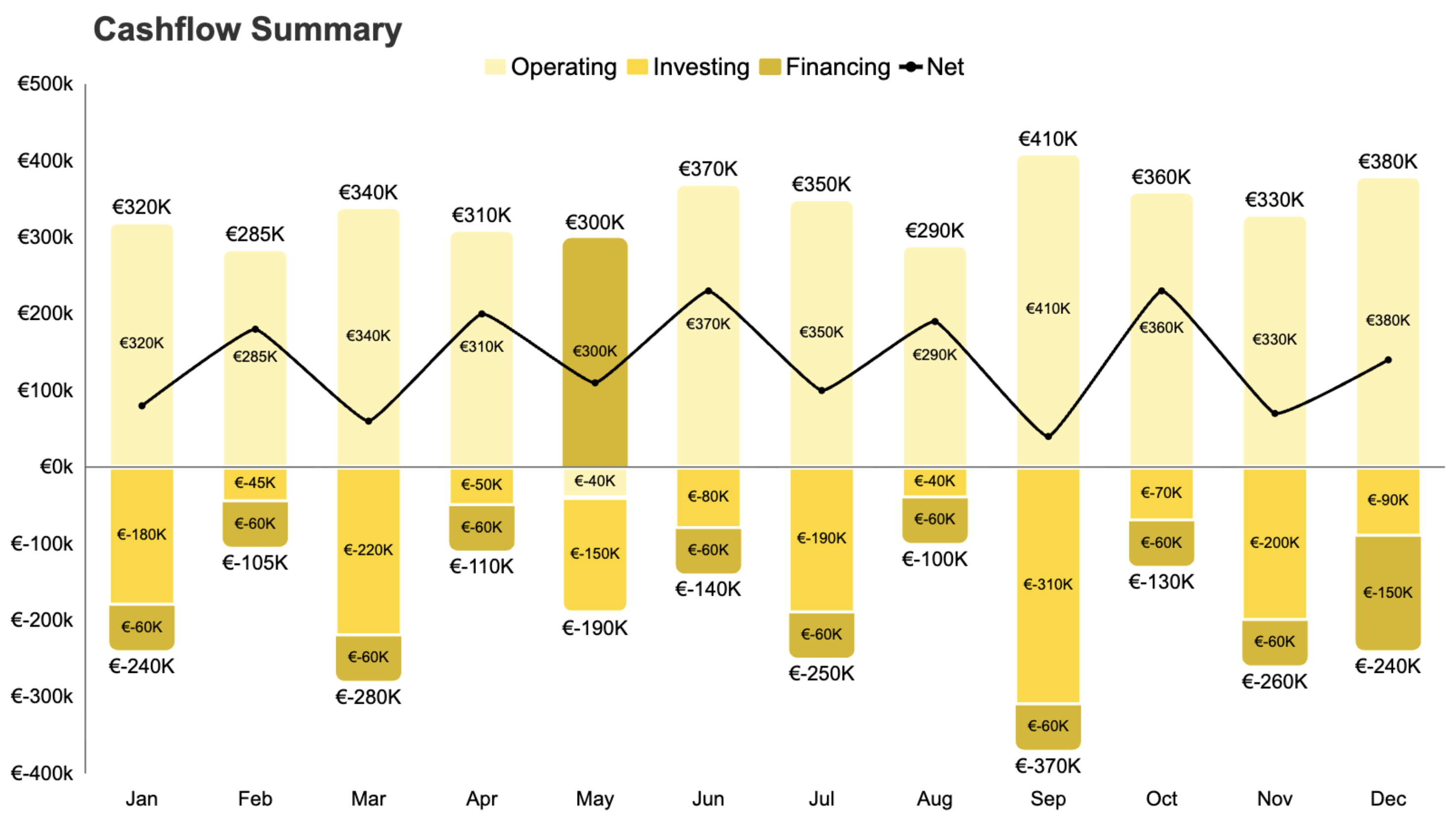
Cash flow summary across operating, investing, and financing activities

A breakdown of cash movement across operating, investing, and financing activities. Not the P&L. Actual cash. Where it came from, where it went.

Use it monthly for internal reporting, quarterly for board-level. Essential for any company where profitability and cash position tell different stories. Which is most of them.

The key question this answers: are you generating cash from operations, or are you surviving on financing? A profitable company can absolutely run out of cash. This chart is how you spot that before it becomes a problem.

Headcount & personnel cost tracking

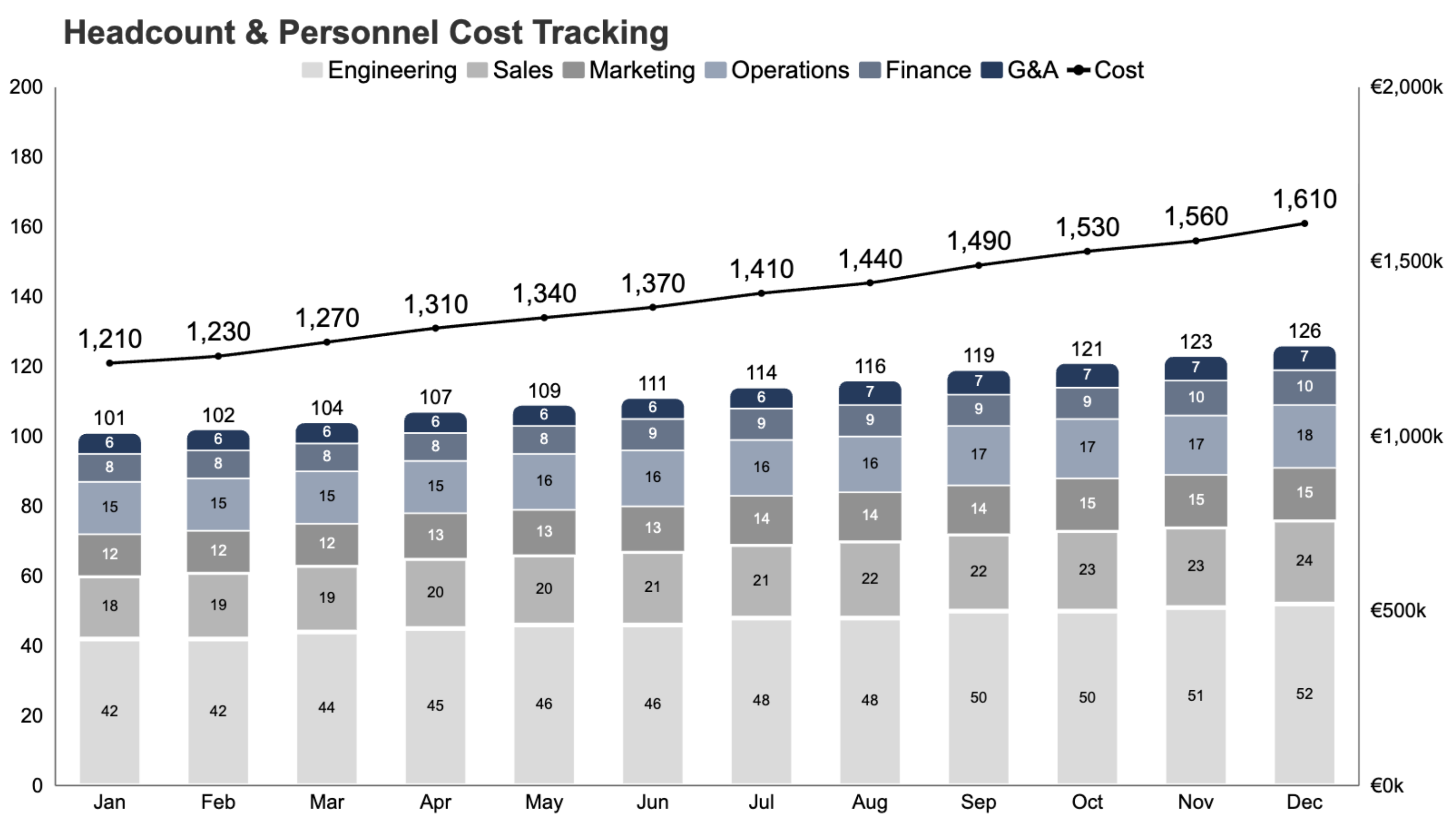
Headcount and personnel cost trend by department

Employee count and total personnel cost over time, split by department. Headcount is usually the single biggest line item in the budget, so it deserves its own view.

Most useful during hiring pushes, freezes, or restructuring. But honestly, it is worth tracking every month just to catch drift. Cost-per-head has a way of creeping up quietly through benefits, contractors, and scope changes.

OpEx breakdown by category

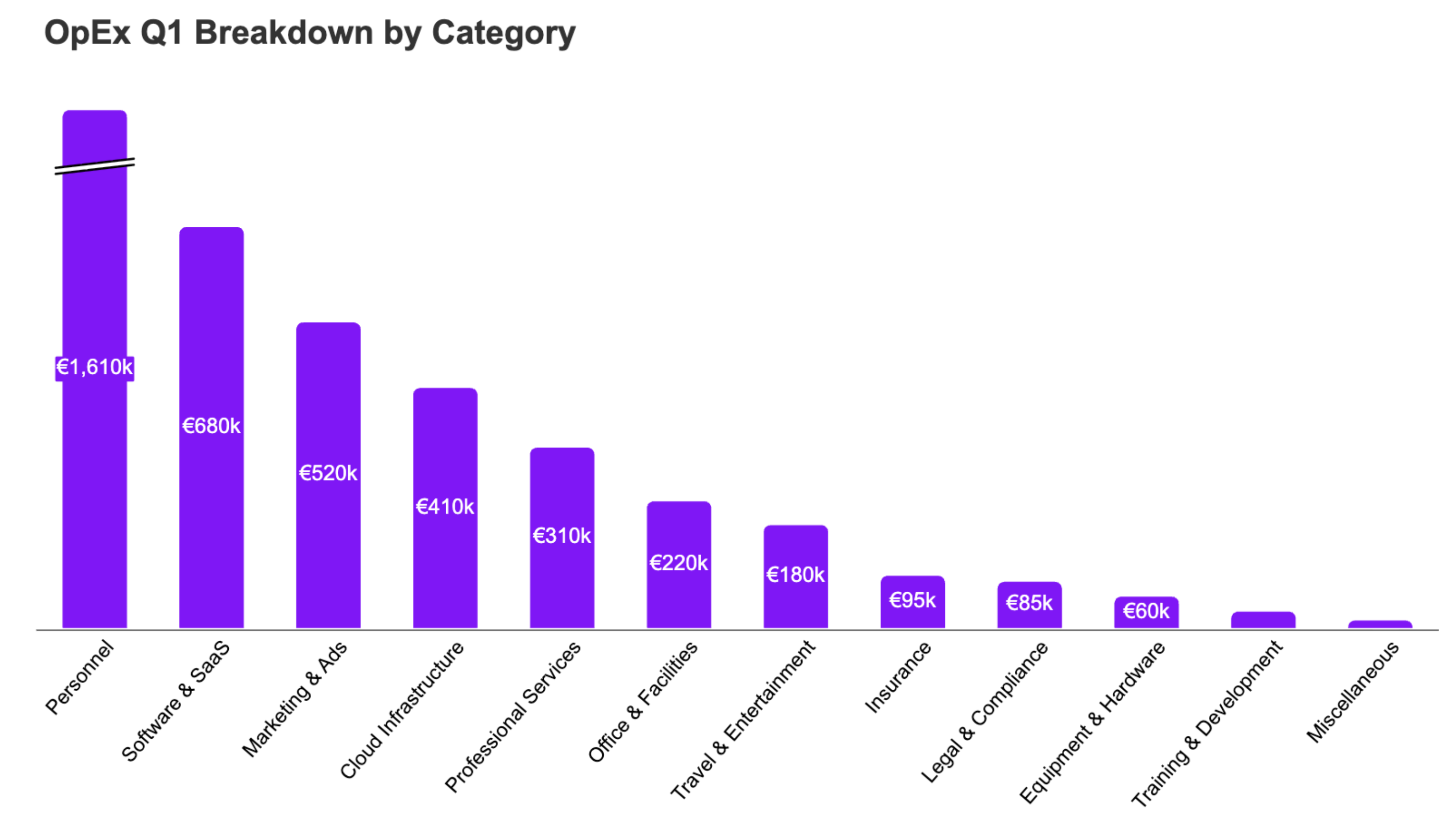
Operating expense breakdown by category

A detailed view of operating expenses by category: marketing, software, travel, professional services, and so on. Think of it as zooming into the cost side of your P&L.

Run this alongside your budget vs. actuals. It is good at surfacing categories that are quietly growing out of control. The "software" bucket alone tends to be eye-opening. Most companies genuinely have no idea how much they spend on tools until someone charts it.

P&L summary (income statement trends)

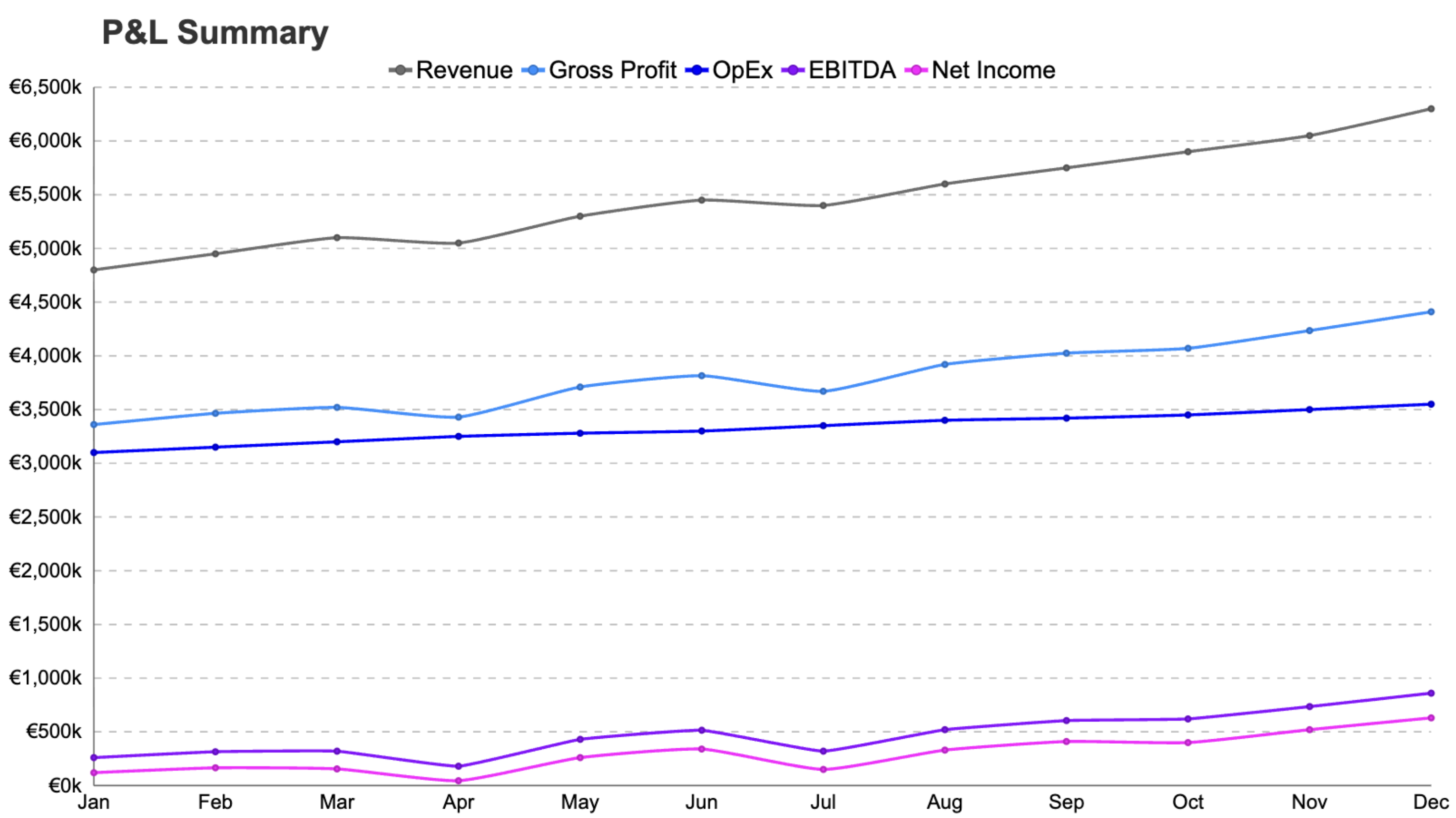
Condensed P&L trend: revenue, COGS, margin, OpEx, EBITDA

A condensed income statement view: revenue, COGS, gross margin, OpEx, EBITDA, trended over time. Not a full P&L dump. Just the key lines that matter for a monthly check-in.

This is the "how are we doing, really" chart. Board members and execs tend to love it because it tells the whole story in one view. A six-month trend tells you more than any single month ever will.

What to watch for: margin trends, cost structure shifts, and whether top-line growth is actually translating to profitability. Or not.

Rolling forecast vs. actuals

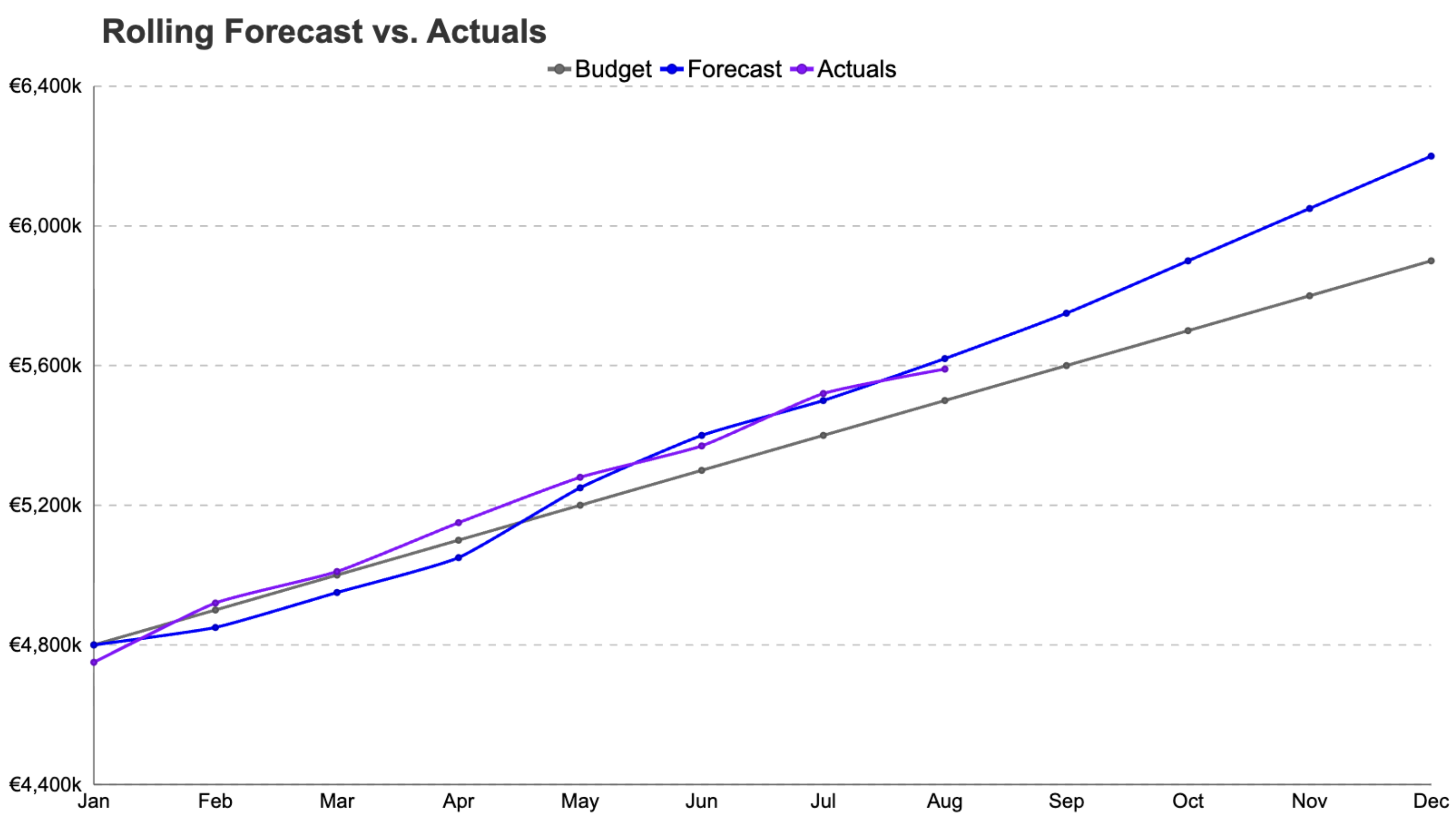
Rolling forecast compared to actuals and original plan

How your latest forecast compares to what actually happened, and how both compare to the original plan. Three lines that tell you how good your predictions are getting. Or are not.

This one only makes sense if you are doing rolling forecasts. But if you are, it is what separates reactive FP&A from the forward-looking kind.

The real value here is in the pattern over time. If your forecast is consistently off in one direction, your assumptions need work. If it is converging with actuals month over month, your model is getting smarter. That is worth showing.

Working capital overview

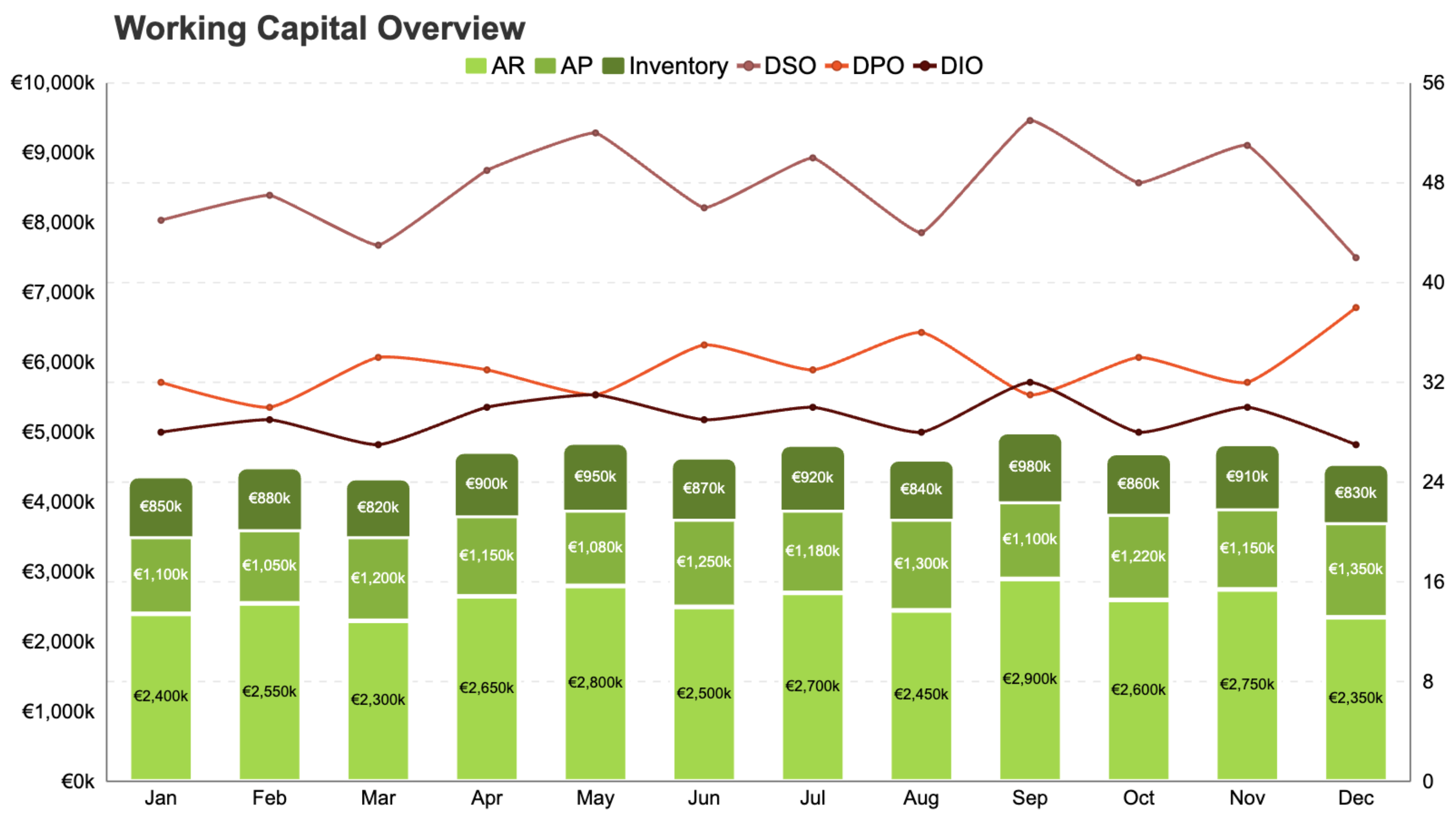
Working capital metrics: AR, AP, inventory, DSO, DPO, DIO

Accounts receivable, accounts payable, and inventory (if applicable), trended over time. Often shown alongside DSO, DPO, and DIO metrics.

This matters most for businesses with long payment cycles or seasonal cash patterns. Less relevant for pure-play SaaS, very relevant for manufacturing, services, and fintech.

What you are really tracking here is whether cash is getting stuck. Stuck in receivables, leaking through early payments, or piling up in inventory. The cash conversion cycle is one of those metrics that is boring until it is not.

That is your monthly toolkit

Eight analyses. Eight templates. All built to help you automate your FP&A reporting process from analysis to finished deck.

If you have been searching for the best tools for automated reporting decks, this is what we built Chartbuddy to be. Pick a template, connect your Sheets data, and your deck stays current without the monthly rebuild.

If you are missing a chart type or template that you would actually use, tell us. We are building this for people who do this work every month, so if something is not here that should be, we want to know.

Happy charting.