
Appearance
Using a Google Slides template
Once a project has a Google Slides template with a guide, you make each new edition by asking for it. New editions are saved in your Google Drive. To set up a template, see Creating a Google Slides template.
Make a new edition
Ask in the project's chat, in your own words, for example "make this month's board update" or "the weekly sales post, with this week's numbers".
The assistant:
- Reads the guide: its purpose, how it is made, the brand rules, the naming rule and what each slide gets
- Reads the last edition as an example, without changing it. If the guide changed since that edition was made, it tells you.
- Asks you for what it is missing, such as this week's numbers. It does not make numbers up.
- Makes the new deck: a copy of the template in your Google Drive, named by the guide's file name rule
- Goes slide by slide by each slide's role, and replaces every
{{placeholder}}with what its field says - Checks the result: it reads the new deck back and makes sure no placeholder is left
Hub shows the deck next to the chat, so you can follow along and ask for changes.
Change one edition
Say it in the chat. Some examples:
- "This time only North and West": a slide with One copy per item gets copies for the items you name, instead of the guide's usual list.
- "Like last week's, with this week's numbers": the assistant keeps what stays the same and changes what should change.
- "Use Anna's last edition as the example": Hub remembers the editions your colleagues made in the project too.
To fix a deck you already made, such as a wrong number, ask the assistant to change that deck. It edits it in place instead of making a new one.
Start from an empty copy
To fill in a deck yourself, click + next to the project and choose Google Slides deck.
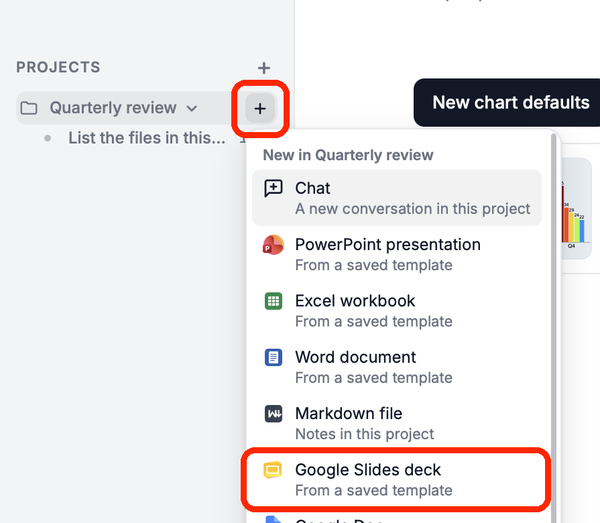
Pick the template, give the deck a Title and click Create deck. Hub copies the template into your Google Drive and opens it. Nothing is filled in.
From another AI app
An AI app connected to Hub, such as Claude or ChatGPT, can make editions too: ask it for the deck and it uses the same project, guide and earlier editions.